gProject panel is now available!
I’ve never been happy with the project panel that ships with Flash, so when we had some spare cycles in the office, I decided it was time to rectify it. The result is a very robust project panel that incorporates all of the features we’ve been able to dream up in a tight, easy to use package. We are polishing it up now, and expect to start selling it in the next couple weeks (don’t worry, we’re staying simple with this – paypal or somesuch, so no unpredictable delays on this one).
Here’s some screenshots of this puppy. I’ll try to list all the visible features on each. I’m really excited about this panel. It’s been a huge productivity booster for us, and I’m sure it will be the same for other developers.
|
|
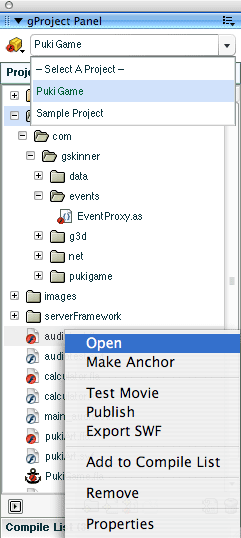
- Reads project directory – no more adding files manually
- Access to multiple projects from dropdown – saved in prefs
- Opens last project opened on restart
- Double-click to open files in IDE
- Right-click for context menus for all files/dirs
- Smart “Test Project” button (bottom left), with multiple modes (open anchor SWF, compile anchor FLA and test, compile current FLA and then open anchor SWF, etc)
|
|
|
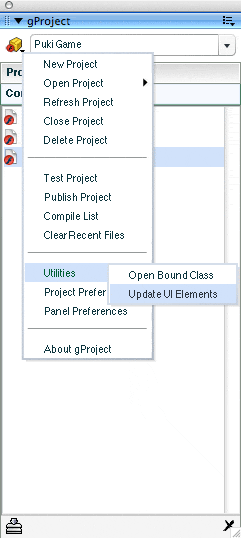
- Project menu, showing different options.
- Multi-compile list (behind project menu) – FLAs can be added to the compile list via context menu.
- Clicking compile button (bottom left) compiles full list at one go.
|
|
|
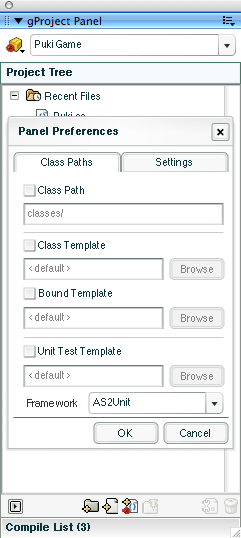
- All class preferences can be set at the panel level, or the project level
- Can change the default class path (where new classes are created)
- Can set up custom templates for new classes, and unit tests
- Support for AS2Unit and ASUnit unit testing frameworks
|
|
|
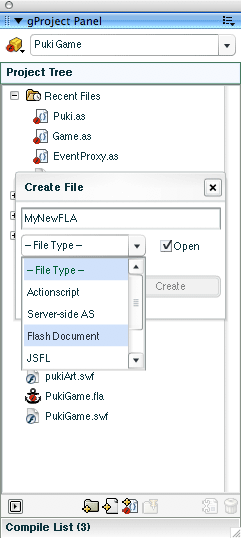
- Quickly create and open new files and directories from within the project panel
|
|
|
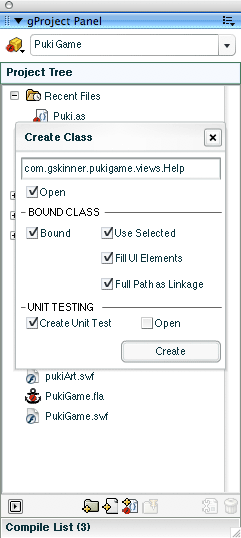
- Class creation: Definitely my favourite feature!
- Type in a full class name, including package path, gProject will create the class file (including the package directories) based on a template (which can be specified per project or globally), and open it for you…
- Select a MovieClip symbol from the library, and create a bound class – gProject will create the class, bind it to the symbol, update the clip’s linkage, and organize it in the library automatically.
- Choose “Fill UI Elements” and gProject will inspect the symbol, and prepopulate the new class with properties reflecting the named clips and textfields in the symbol. It even ships with a JSFL that lets you update those class properties automatically later.
- Check “Create Unit Test”, and gProject will automatically create a unit test class for you using a template of your choice, and according to the unit testing framework you chose for the project or globally (currently we support ASUnit and AS2Unit).
- Remembers your settings, so you don’t have to re-type the package, or set up the checkboxes each time.
- Standardizes your class structure through the use of templates.
- Seriously, this is REALLY cool in use.
|
|
|
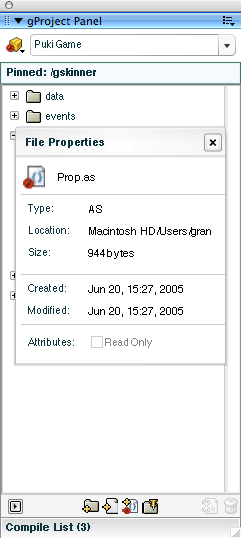
- Pin directories in your project to reduce clutter (note the “Pinned: /gskinner” header in the screenshot)
- View last modified dates and other file info without leaving Flash
|
Again, I think this is easily the coolest Flash extension we’ve built to date – it has really helped us to develop more quickly, and in a more standardized manner. We considered releasing this one free, but we’ve invested a lot of time and effort into it. We will be releasing another couple of free panels over the next little while though, so keep checking the gBlog.


How about “free to the first person to comment”?
This sounds awesome, I have alway hated the built in project panel and avoided it most of the time.
Come on gMeister, you have my undying admiration and respect, why not give me a little something back huh? 😉
Looks great. I have been waiting for something like this too! Maybe a lite release or something might be a good idea?
I thought I would have to wait for FDT and eclipse to solve this problem or maybe even Zorn but here ya go. Just out of interest has it been tested for 8Ball as I think the release wont be to far away after seeing the malestrom release.
:o) Well done though you got this one bang on by the looks of it.
That is way too exciting – if not for free, how soon until one can buy it?
The retail version better use the glic components instead of the v2 ones I see in the screens 😉
Man I wish this had come a year ago – I’ve gone Eclipse and I’ll definitely never go back!!!
very cool tool! what are you thinking about for the pricing? looks great though! awesome job as usual grant.
grats for this cool extension.
but I went for asdt ( asdt.org ), and now fdt ( http://www.powerflasher.com/fdt ), and I can’t imagine to switch back to Flash IDE.
I encourage flash developers to give a try to Eclipse IDE. this might be worth a try.
I’m surprise you didn’t yet Grant. 😉
It will be priced well under $50, to keep it accessible to anyone working with Flash professionally. It looks like we should have it available to purchase next week some time.
I’m keeping a close eye on FDT, it sounds like an environment that I might lure me away from the IDE. Regardless, I’ll still be spending a fair amount of time in it working with FLAs, and tweaking classes, and I expect the gProject panel will remain useful, even if I’m doing a majority of my coding in an external editor (who knows, we might even integrate it with FDT in some ways).
I was just thinking the same thing and started building one myself. Maybe now I wont have to do it 🙂
maybe a combination with FDT/Eclipse would be possible?
Is it ready yet huh huh huh is it ready yet……
:o)
Florian,
Yes, I hope there are ways we can integrate it into the FDT workflow – we’re definitely looking at this.
Campbell,
It’s ready – we’ve added in a couple more capabilities, and run it through some formal testing. I’m currently at yet another conference (in Banff this time) until Thursday, and we should be making this panel available shortly after I get back (maybe Friday, but Monday is more likely).
Sweet,
cheers Grant and good luck with the conference.
Campbell
Can’t wait till the release. Still coming soon?
It’s coming. The panel is done, has been through a couple rounds of bug fixes, and is awaiting a final runthrough of the documentation/licensing.
Yep, finished up documentation today (doing a final review, then will post a new entry with it). Just setting up for payments, and finishing packaging it all up, then we’ll be open for business!
🙂
who do I send money to?
hello gSkinners,
i don’t know if there’s a need for, but I will afford you a translation of your great panel into German. In exchange for a gratis-License.
Regards
Robert
BUG?!?!?!?!
The right click option works with Flash MX2004 but doesn’t seem to work with Flash 8. Tried at home and at work (same config: WIN XP prof). But this doesn’t make a difference.
Any suggestions?
Niels:
There is a bug in Flash 8 which caused issues with context menus, and as such the initial version of gProject was prone to problems in Flash 8. We released gProject 1.1 (and 1.2) which addressed this (and other) issues.
Check the version in the “About gProject” dialog. All users who purchased gProject before Flash 8 was released are eligible for a free upgrade (and should have been sent one when it was released).
If you (or anyone else) has any problems with gProject, please email gProject@gskinner.com.
You and your community are an inspiration!
I want to install gPanel but I am warned that some Flash Prof files already exist with the same names. Can you please tell me which ones they are so that I can copy and replace then if I need to.
John
The files it asks to replace are all common utility JSFL files, which you can replace freely without causing any problems. Preferences are not shipped with the extension, but are created on first use, so you don’t need to worry about those.
To back up your preferences, simply back up the gskinner/preferences directory in the flash configuration folder. More information about the location of the preferences can be found in the documentation that ships with the panel.
Thank you for responding. On preferences, I have gProject too but no gskinner preferences directory – probably due to having none set yet. On the file issue for gPanel…
JSFL doesn’t refer to a file extension, there are none, so what is it? (JavaScript Function Library?) If so, which files in which directories do I need to backup? If I later remove gPanel I want to get back to square zero.
I am really looking forward to using the products.
John
Okay, I found JSFL. That list of overwritten files would be useful.
And, by the way, the gskinner.com/talks/puki/ tutorial is really appreciated.
John
i’ll like to get some of your forum or caterloge. thanks
Would the paths work if two developers are using different systems ( OS X & PC )