
I recently had a very interesting discussion with Andreas Heim, Peter Hall and Werner Sharp (Flash Player Engineer) about DisplayObject.scrollRect, and learnt a lot about the specific mechanics of how it works in the current player.
DisplayObject.scrollRect lets you specify a Rectangle object that defines the region of the DisplayObject (Sprite, MovieClip, etc) to display. The masked region is always displayed at the origin of the display object, which lets you scroll the region by changing the x and y properties of the rectangle.
// Rectangle constructor params are x, y, width, height mySprite.scrollRect = new Rectangle(0,20,50,50); |
For instance, setting the scrollRect as above would mask a 50×50 region of the sprite starting 20 pixels down, but the masked view would still be placed at the sprite’s origin, so it would appear to be scrolled 20 pixels up.
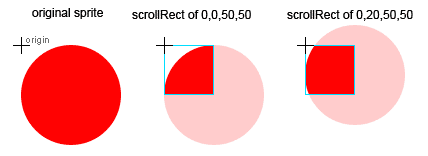
Sort of handy, but scrollRect really becomes useful when you combine it with cacheAsBitmap. When cacheAsBitmap is false, scrollRect is basically treated the same as a normal vector mask by the renderer. Vector masks are very inefficient in Flash, because the whole DisplayObject is rendered, not just the visible portion. However, when you set cacheAsBitmap to true the renderer switches to an optimized mode where it only renders the masked area of the display object to the bitmap cache, and then uses a combination of bitmap routines and incremental rendering to scroll the content. This can be used to gain very substantial performance benefits.
mySprite.cacheAsBitmap = true; // Rectangle constructor params are x, y, width, height mySprite.scrollRect = new Rectangle(0,20,50,50); |
Note that this has the same considerations that are usually associated with cacheAsBitmap. If the display object is dirtied (ie. it changes visually), the Flash player will re-render the bitmap cache, so this technique generally does not make sense for content that is likely to change each frame (though it might if the content is much larger than the masked area). It also has memory overhead from having to maintain the bitmap cache – though I assume it would be lower because it is limited to the masked area.

Aren’t your Rectangle constructor params reversed?
Rectangle(x:Number = 0, y:Number = 0, width:Number = 0, height:Number = 0)
Whoops… good catch. Fixed now.
Well this should be handy for every zooming interfaces, right?
This is often a good solution to elaborate scrolling interfaces, and can be made in a fraction of the time.
-Eric
Very very nice.
I was rather disillusioned with the documentation provided in Flash stating that to actually scroll an item you needed to make sure that item was was nested inside a second movieclip. Altering the Rectangle object (and reapplying the scrollRect) is MUCH more practical option.
Grant (or anyone) – I have been trying to figure out if scrollRect provides any advantages for scrolling masked items that are already bitmap – specifically imported jpegs. If I have a large (let’s say panoramic) photo that is loaded from an external source and I want to mask all but a portion but then scroll the image within that region, does scrollRect provide any advantages? I understand that cacheAsBitmap offers great performance advantages for vector art but I’m not clear on whether those advantages apply to something that is already bitmap. Thanks for any clarification.
I don’t think the memory usage drops when you cacheAsBitmap and then scrollRect a MovieClip object. The speed benefits are due to the fact that the whole clip is rendered once to a bitmap and then only a portion of that bitmap is “drawn” per frame, so changing the location incurs no additional rendering, still, the entire MovieClip must be rendered in the first place in order to gain the benefits of the cacheing.
Note: You can get a lot of interesting results trying to use this method with text, I suggest rendering the MovieClip to a BitmapData object, attaching that to a new MovieClip instance, and deleting the old MovieClip, then using a scrollRect on the new MC holder. If the content of the MovieClip will never change this offers significant performance improvement (at the loss of some control)
great to see this is fixed up in AS3. we spent a lot of time trying to combine scrollRect and cacheAsBitmap for performance increases for large scrolling lists, but we had to abandon the idea due to serious bitmap artifacts.
i haven’t had time to test it with AS3 yet, but i think the artifacts were in some part caused by setting cacheAsBitmap to true for a movieclip with bitmaps and vector content inside its scrollRect. it sounds like this is fixed?
Have you seen any weirdness with scrollRect and mouseEvents? I’m getting a weird error where, if mc, is the movieclip the scrollRect is applied to, mc.height before a mouse event is correct, but mc.height after a mouse event is the same as the scrollRect height.
I love you!
i have a project that is jerky and slow with its complicated zooming & panning and you have just fixed it and made my client stop being pissed at me.
thank you!
Be careful using scrollRect with flex components. My VBox produced image artifacts consistently (on firefox only, wmode not window).
When I switched from scrollRect to x, the problem went away.
Sadly there still seems to be issues using scrollrect in 9.0.115.
In IE I get the same old artifacts when scrolling large bitmapcached sprites using scrollrect, everything works fine in FF though. Has anyone else tackled this issue yet?
Thanks for passing on the information! Using cacheAsBitmap in conjunction with scrollRect greatly improves performance.
Hello –
Sounds interestingâ¦
Now I have to zoom-in a very huge photo (almost 3000px).
Will “scrollRect” help me (vs. a regular vectorial mask)? Or it isn’t cool for in my case?
Thank youâ¦
– Dimitri
One problem with scrollRect is, once the scrollRect has been set, it’s pretty hard to find the full height and/or width of the unmasked content. I’ve posted a solution on my blog (link below), if any one is interested.
A good example of the scrollRect properties is the Accordion component of the Flex framework.
Adobe dev team uses it with a Tween effect in order to have the accordtion effect, very good to understand the scrollRect.
I have tried increasing the width/ height of the scrollRect once its been set, say your swf scales ot the window size, but nothing will increase its width or height.
So I have instead of increaseing and decreasing the width and height of the scrollRect when the stage is resized I just create and assign a new rectangle to the components scrollRect property.
Is this the best solution?
To find the width and height of the scrolled content, just put all the content in a “content” movieclip and attach it as a child to the container clip and set the container clip’s scrollrect. The content clip itself is not clipped, so you can just check its width and height as usual, whereas the container holding the content will be clipped. Anyway, you should calculate and maintain the size of your content as items are added and removed to/from something like a list, and dispatch content resizing events so your container control and any scroll bars can adjust themselves.
Great post. But what If I need to get the width of the movieClip “after” it is masked? Especially, if I have it inside a big sprite container, and I need to get the height and the width of this container to center it on the stage… I have this problem and I can’t find a solution. Any Ideas?
How would you get the height of the circle
(the contents being scrolled or total content height and width)