
Our development team is in a mixed environment of Mac OSX and PCs (mostly WinXP), and one of the challenges we’ve always faced is time tracking and reporting. There are plenty of decent, low-cost options on either platform, but we were never able to find a single time tracker that worked on both that met our needs. When I started playing with Apollo, I realized that it would be a great technology to build a cross platform time tracking application that did everything we needed. We’ve been working on it for awhile, and the result is a cool Apollo app we’ve code named gTimer (the name will change). If you’ve attended any Adobe keynotes or conference sessions about Apollo you may have seen it demoed.
I think it’s somewhat unique, in that it leverages Apollo’s potential in a different manner than the one Adobe is promoting. Rather than taking an existing web property, and moving it onto the desktop, we have created a new desktop application that takes advantage of the web, the Flash platform’s capabilities for rich UIs, and Apollo’s cross-platform support.
gTimer provides some great features, like network synchronization and aggregation, and a unique week view that lets you visualize and edit your week’s tasks in a familiar format (we will likely be licensing this view as a component for Flex developers as well). We’re also working on a mobile version of the app that allows you to track your time on the road, then synchronize with your desktop app. The final piece in the puzzle is a reporting app that lets small and mid-sized companies generate custom reports on aggregate time usage data, for invoicing, HR, or other analysis.
The whole app was designed entirely in Flash CS3, including the icons, then developed in Flex 2. This is huge for me, because it’s the first time I felt completely comfortable doing conceptual design directly in Flash (I normally do concepts in Photoshop and then redraw it in Flash). At least for me, Flash CS3 has finally hit the critical mass of features where design feels quite natural. We were also able to reuse most of our graphics work, and some of our code logic directly for the mobile application.
We’ll post more details about it in the future, but in the meantime, here are a few screenshots of the app. This is of course a pre-alpha, so it’s got some rough edges, and not all the design is polished off, but it’s approaching its final form. You can also visit the placeholder page for it here, to get more information sent to you when it becomes available.
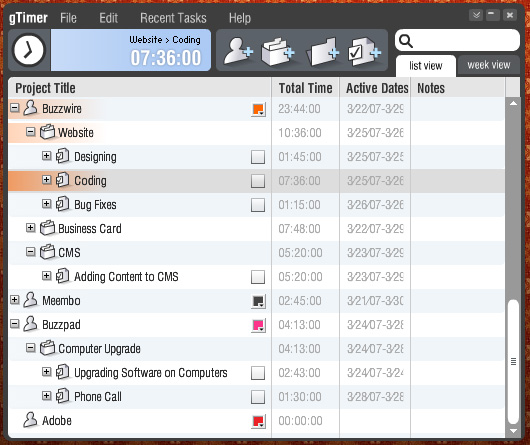
Tree list view. Fairly standard view for most time management applications.
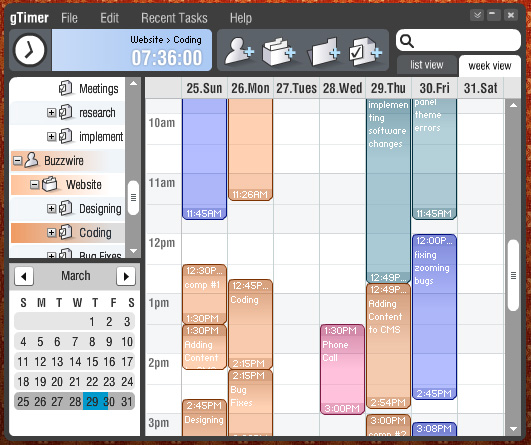
Week view. Visualize and edit your time in a view similar to iCal, Outlook, or google calendar.
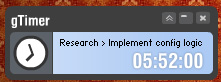
Minimized view. You can tuck this view away in a corner, and quickly switch between recent tasks.
Check out the gTimer placeholder page for updates.

Awesome app, Grant! Kevin Lynch (Adobe’s Chief Software Architect) demonstrated your app in our big financial analyst meeting yesterday and I hear it went really well.
Very impressive!
– MD, Adobe
Preview of Grant Skinner’s first Apollo app – awesome!
Grant Skinner and his company have been working on a really kick-ass Apollo app for tracking time. He has a great write up of why they built it, how they built it, as well as some screenshots of what…
Grant,
Saw this demoed by one of the Mikes (Two Mikes for the price of one) at the WebDU Day One Keynote. Nearly cried cause it looked so cool. Top work.
Grant,
Looking good. I’ve been working on the bits for and a application similar to this one. Started it as a Flex application back in the Flex 2 beta days.
I find it hard to spend any time on it. Check out my blog and look at some of the recent posts as well as ones back in November 06. Submitted the start of my time / task drag and drop component to the Rocketboots space race (developer derby). I haven’t had any time to update it or finish it. Check it out at http://www.kaffien.com/flex/myflex.html
Anyway, look forward to seeing more of what you have done.
Cheers
Gareth.
Apollo surprises
Apollo surprises: Even though there’s been so much discussion about what a “universal client” should do, it’s only when lots of people toss it about that we really learn what it is. That first link goes to Tara Hunt, who describes how Scrapblog was a r…
Awesome
gTime: a Apollo Time Tracking Application by Grant Skinner
“Our development team is in a mixed environment of Mac OSX and PCs (mostly WinXP), and one of the challenges we’ve always faced is time tracking and reporting. There are plenty of decent, low-cost options on either platform, but we…
Nice app, well done.
btw. Adobe’s open source scheduling framework offers a similar view as your week view. Not vertical though, but horizontal.
js
Hey Grant, this looks great!
I made a little time-tracker in college and it really helped me out. I often thought about features I wished it had (especially the mobile option). It seems like you folks have gone out and done it!
Gimme! Gimme! Need testers? I signed up at the page you linked.
I could see this get really popular at my workplace.
-tim.
Hey Grant!
I heard about this at ApolloCamp…it looks really slick. Signed up for the demo, can’t wait to use it. We’re another web service to do time tracking that isn’t cutting it. Please activate our account as soon as you can. We’re developers too so can handle some rough edges:)
Andre.
hey Grant, looks great! FYI we have a little timesheets intranet. It’s geared around accounts and clients. i.e only the Project Managers can set up Account/client/project details. We then have to choose from these lists what we’ve worked on. We also have a section for time spent on internal things like meetings, R&D, holidays etc. My question is can gTime accommodate this? i.e have different admin privileges for different people? It can help make sure time can be collated per projectâ¦
What are you building the mobile version in? There is no mobile Apollo or Flex is there?????
Scary how nice this looks. Sunbird will definitely be disappearing off my computer when this shows up.
Awesome, as always! Also waiting to get hands on Flash CS3..
nice … so like .. what would be the backend language? PHP/ASP/JSP etc?
I hardly can’t wait to try it… 🙂 Any idea on a release date for the public version?
I was thinking on building something similar, and also asked on the Portuguese RIA ML if there was someone interested on starting an open-source project management application in Flex. I do not have much time available on the next month, but if you need an extra hand, let me know. 🙂
Sweet. This looks awesome. I’ll definatley download it when you guys release it. I can’t wait to start making some Apollo apps too. Apollo rawks.
Very nice! I guess we’ve all wanted to create one of these things at some point — glad to see you’re doing it in style!
Hi,
I saw a demo of your TimeTracker today on the Adobe Live in Amsterdam. Look very nice. I was specially interested in the calender component. For a private application, I have been looking for something just like that. The Adobe Scheduling Framework is just for displaying, but I’m looking for the kind of interaction the TimeTracker has.
Is the calendar component open/available publicly?
We will be licensing the calendar component for Flex developers. Shoot me an email and we can talk about including you in a beta.
Great example of Flex coding and very polished GUI!
We are developing a PIM using Flex, but we need a Time Sheet module as well that we haven’t coded yet.
Please keep me posted when a beta is available for testing.
Hey!
This is just the tool I’m looking for! I’m a AIR developer too! I really love it that you now can create software with actionscript! Please let me know when this tool is available. And if your looking for someone to test it! let me know 🙂
Kind regards!
Jankees
Anything ever going to happen with this? its been 6 months now and still the same post/screenshots and not a peep.
Looking forward to the release.
I have a small company working with legacy lotus approach app. This links exported calendar data, project data, tasks and phases. Reports include timesheets and exports to project billing. I’m just starting to look at how this should be done in the future, hopefully without losing legacy data.
We would need the pull down lists linked to projects, but this certainly looks like it would do the trick. Hopefully something that wouldn’t need a dedicated programming or IT staff to keep up and something that could be added to and programmed on the fly, if you had the right admin rights. Looking forward to updates.
Bump. What he said in September. Any activity on this project? Looks interesting!
any news on gTimer?
Seems as though it’s been almost two years since anything has happened with this. Looks like JUST the kind of app we need. Any news?
I suggest http://www.hourdoc.com‘s time tracking software. It is easy to use and very affordable. They offer free application to companies with less than 50 users.
I use http://www.hourdoc.com ‘ Time Tracking Software
s time tracking software for my company. It is easy to use and very affordable. They offer free application to companies with less than 50 users.
My favorite is http://www.e-tim.org Project Time Tracker its very simple and its FREE