
When doing design work in Flash (or laying out design elements), one of the most common panels to have open is the Align panel. It’s great for relative alignment and distribution, but we thought we could kick it up another couple notches. The result is the gAlign panel.
UPDATE
We have uploaded a new version of the gAlign panel, which works with shapes, drawing objects, and groups. Note that shapes will not work with the new drawing options.
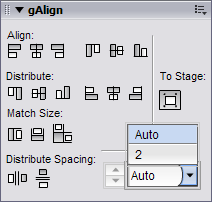
VII. gAlign Panel
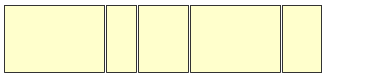
This panel has all the functionality of the Align panel (the top 3 rows), but with some much needed absolute spacing commands along the bottom. The “Distribute Spacing” commands use custom JSFL calls to distribute your elements based on the edges of the elements, rather than the registration points. For instance, refer to this image:
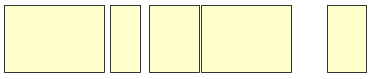
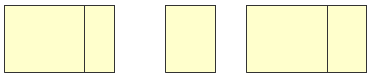
If you were to “Distribute” the items horizontally using Flash’s built in distribute, you would end up with the following result:
Using the new “Distribute Spacing” option in gAlign (and a spacing amount of “Auto”), you would get horizontal distribution based on the size of the elements.
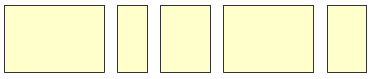
Further, using the numeric spacing options, You can specify an absolute space between items. Applying a spacing of “2” to the first example would yield this result:
Please feel free to let us know if you have any comments or suggestions.
There are a couple things to note.
- Apparently, the new align functions do not work with shapes. This is a limitation in flash.
- The “To Stage” toggle does not apply to the new align modes
- Flash treats each individual symbol position change as a seperate UNDO, instead of as a combined UNDO, since we use seperate JSFL calls to move each element.
- In order to align objects flush up against one another, you can distribute their spacing with a value of zero!
- This panel was developed for flash 7 and 8, but works in Flash 9.

By “works in Flash 9”, do you mean the Flash 9 Public Alpha or CS3? I just tried installing it with CS3 and although it claimed to have installed successfully, there was no change of my Align panel upon restart. Looks like a handy tool though!
Nate: The panel does not affect the built-in Align panel, rather, it installs into the “Window/Other Panels” menu.
Thank you for sharing this. Much appreciated. You guys just don’t stop do you.
Nate, I suspect it got installed for your copy of Flash 8. Maybe get the new extension manager?
Generally, looks great.
Only works on clips though–I guess that’s a limit of JSFL. Also, I think I’m getting some funky results with strokes not counting as part of the object’s bounds. I’ll have to test to say exactly.
Installed this and when i wanna open it, it opens my dart motif options window. on a different pc it opens up another extension’s window..
Hey Marv,
That’s a bug of Flash rather than the extension. You can fix it by going into your Flash configuration and simply deleting the panel layout XML (called panelset.xml) It will get re-generated the next time you start Flash and all will be well. Also, I think there is an automated fix for that problem on this blog if you look through past entries.
All the best,
-tim.
“absolute space” with a value of zero is an “absolute must have” I always wanted. 😉
Thank you very much.
Marv, please see:
http://www.gskinner.com/blog/archives/2006/11/flash_opens_the_1.html
Lanny: Yep, I thought it replaced the normal Align panel. It all seems to work great in CS3 so far. Nice work and thanks!
Sounds like an outstanding tool, but am I the only one who’s getting no function at all from this? I install the MXP and place the panel, but none of the actual buttons on the panel do anything.
FWIW, I’m running Flash CS3 under Windows.
Also, am I the only one who can’t tell the difference between the selected and unselected state for the “To Stage” button? Both states appear as a button, but one state has a darker background. I still haven’t figured out if the lighter gray or darker gray means “selected”.
seems not work for shapes?
old9:
We have updated the panel to work with shapes. Note that the new functionality will not work with shapes, but will with groups and drawing objects. Download the (updated) zip file above.
The latest update fixed my problems. Big thanks!
Thank you so much 🙂
Did the JSFL API for Flash 9 changed a lot as for 8- ?
Do I need to rewrite my former JSFL code ? What is your feeling on that ?
aw: No, the API is the same, with new additions to support new features in Flash 9 (and there are a lot). So far we haven’t encountered anything detrimental.
It doesn’t seem to work in CS4, or I can’t get it to work.. It installs normally, but the panel doesn’t appear anywhere..
@schpinn The gAlign panel does in fact work with CS4, just ensure you are using the CS4 Extension Manager, and not the version shipped with CS3. Once its installed you can open it by browsing to Window > Other Panels > gAlign.
This is fantastic, I wish would have found this sooner. The only thing is that the background color of the panel is different than the other panels on the Mac so it looks a bit out of place, not a big deal. And the Align to stage button looks like it’s checked when it’s not, I keep making that mistake. The distribute spacing feature is amazingly useful. Thanks allot.