
UPDATE: Official Adobe AIR support, August 21
Adobe has released official support for AIR in Flash CS3. We’ll keep the AIR panel available, but it’s unlikely it will be updated any further. Get the Flash CS3 update for AIR.
Currently, you can only create AIR (formerly Apollo) applications with FlexBuilder. Adobe has already announced that they will be adding support to Flash CS3 to create AIR projects, but we wanted a solution in the meantime. As such, we’ve extended the work that Guy Watson began with his “Test in Apollo” jsfl command, and built a panel that lets you test, configure and compile AIR applications from within Flash CS3.
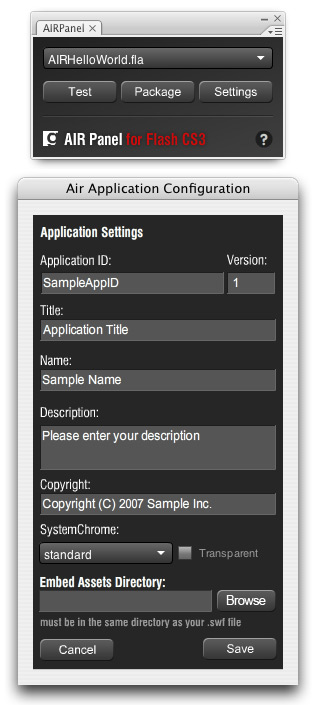
Step 1: Install the AIR global SWC
The AIR global SWC is a compiled class library containing the AIR API. Flash CS3 needs a copy of it in its class path to compile against.
1. Install the FlexBuilder 3 (“Moxie”) beta, or download the Flex 3 SDK from Adobe Labs
2. Locate the “airglobal.swc” file in one of the following locations:
– in the FlexBuilder 3 “Moxie” application directory, in “sdks/moxie/frameworks/libs/air/”
– in your applications directory in “Adobe Flex Builder 3 Plug-in/sdks/moxie/frameworks/libs/air/”
– in the FlexBuilder 3 “Moxie” SDK “frameworks/libs/air/”
3. Make a copy of that file in your Flash CS3 application directory under “Configuration/ActionScript 3.0/Classes
Unfortunately, the AIR SDK does not include this file. You must get it from Flex 3.
Step 2: Install the AIR Panel
This installs the AIR Panel in Flash CS3, which will let you configure, test and package AIR applications
1. Install Extension Manager v1.8
1. Download the AIRPanel zip file from here and unzip it.
2. Run the MXP file to install the panel.
3. Restart Flash
4. In the Window menu, select Other Panels > AIRPanel
If you do not see the AIR Panel, ensure you’re using Extension Manager v1.8, and try reinstalling the MXP.
Step 3: Using the panel.
Now that the panel and SWC are installed, you can start creating AIR applications in Flash CS3. You can create your application as you would normally, but you can now use the AIR API without generating compiler errors. Note that you will receive runtime errors if you test movies normally when using the AIR API.
Testing in the AIR runtime:
1. Select your open FLA from the dropdown in the AIR Panel. If you don’t see your FLA, make sure it is saved (unsaved files are not shown in the list), and wait a few seconds.
2. Click the “Test” button in the panel.
5. If this is the first time you’ve used the AIR Panel, you will be prompted for the location of the adl file. Select “adl” (no extension) on Mac, or “adl.exe” on Windows from one of the following locations:
– in the FlexBuilder 3 “Moxie” application directory, in “sdks/moxie/bin/”
– in the FlexBuilder 3 “Moxie” SDK in “bin/”
4. Your application will compile and open in the AIR Runtime. Quit your application to resume working with Flash CS3.
Packaging your AIR Application
1. Select your FLA as above.
2. Click the “Package” button in the panel.
3. If you have not already specified configuration settings for this FLA, you will be prompted for them.
4. As above, if this is the first time you’ve used the panel you will be prompted for the adl file.
5. Your application will be compiled and packaged into an .air file in the same directory as your SWF.
You can update your configuration settings at any time by selecting the FLA in the panel as above, and clicking the “Settings” button.
One of the advantages of having this as a panel is that you can test your AIR applications without having to click back to your main FLA (ie. you can do it while editing an asset FLA or a class file).
Troubleshooting
If you have problems, check the following:
- Be sure you are using the correct adl for your system (adl for Mac, adl.exe for Windows), and that it is from the Moxie build of the Flex SDK or FlexBuilder. You can reset this setting by deleting the config.dat file from in your Flash CS3 configuration folder in gskinner/AIRPanel/config.dat
- Check that your SWF is set to export to the same directory as your FLA (we are looking at ways to remove this limitation).
- There may also be an issue with FLAs on network drives.
- Ensure you have the latest java virtual machine. You can download it from java.com
If you are experiencing difficulties on Windows, you can also try using “adl” instead of “adl.exe”, just be sure you have the latest JVM installed.
Note that the airglobal.swc and adl files seem to reside in a few different locations. If you can’t find one of them in the locations above, do a search for the file, and let us know in the comments below where you find it. If you don’t find it, make sure that you have the FlexBuilder 3 beta, or Flex 3 beta SDK installed.
UPDATE: Release 2, July 3
Please use extension manager to remove the previous extension prior to installing this version! Everything should still run ok, but removing the old version in the future may cause problems.
The zip file linked above has been updated with a new build. The most significant updates are the addition of a setting for window mode (system or transparent), and support for XML round-tripping, so edits/additions to the AIR application XML file will be preserved. We’ve also tweaked the interface, and made some other minor updates.
In a bid to reduce the issues with a jsapi bug and long file paths, we had to put in some messy fixes. Let me know in the comments if you experience any bugs or difficulties.
UPDATE: Release 3, July 4
Fixed a minor bug where the panel would overwrite the app xml file when packaging.
UPDATE: Official Adobe AIR support, August 21
Adobe has released official support for AIR in Flash CS3. We’ll keep the AIR panel available, but it’s unlikely it will be updated any further. Get the Flash CS3 update for AIR.
We will likely be releasing additional updates based on feedback, so check back here soon (clicking the “?” icon in the panel will take you back to this post). If you have any feature requests, or encounter any problems, let us know in the comments below.

Totally Awesome!
Flash CS3 AirCompiler
Read more here. Grant (Skinner) sent this to the list, over the weekend, and I had a chance to play with it. After setting it up (which he admittedly says isn’t the fastest; they’re working on it though) I was…
This is awesome, can’t wait to see what is created now!
Grant –
I’ve already put this to use and really like it. Any chance we could get a way to set the systemChrome in the setting? If I modify the app.xml manually, it works when I test, but gets over-ridden when I package the file. or a way to turn of the auto-create app.xml?
John – that’s definitely high on our list for the next update, which will be released in the next few days. Let me know if there are any other features missing that you’d like to see.
Watch out – Yyou’ve opened the flood gates now. 😉
Actually for only big wish is being able to set all the attributes of rootContent node, either via the panel in CS3 or just being able to tell the component to use a pre-existing app.xml file which I may have updated manually.
Other things that would be cool, but not as necessary (at least for me), would be setting icons and the install folder. But if it can use my pre-existing xml file, then I can do that myself. Others might appreciate it though.
Great Job!!!
But don´t work, i try and the panel produce for me only a .js file and .html file
Awesome. Simply.
Good Stuff! Nice work mate 🙂
Yes great job, but I am having the same problem as Ruben, the app.xml file is created, but no .air file.
This is occuring when you are packaging, correct? And you have already set the path to the ADL file (making sure to select the correct one for your platform – adl for Mac, adl.exe for Windows)?
Just making sure, because it’s been working fine on all of our test machines.
Thanks.
Got it to work, now time for some play…
It seems to be a network issue. If I save the fla on my computer, it works fine, but if I save it on the file server, it doesn’t create the air file. All the other files get created, just not the air file.
What´s ADL, this panel don´t ask me for ADL.
Excuse me, please i can´t understand.
I try and nothing for .air file.
Thanks…
Please, how set the path to adl if i already use and don´t configure?
help me, i interesting on this…thanks
I already use and don’t configure too
All configuration data is stored in a gskinner directory of your Flash CS3 Configuration folder. It should have been in a sub directory (and will be moved in the next update), but for now you can delete the config.dat file if you think you pointed it to the wrong adl file.
For example, on Mac/English it is at:
~user/Library/Application Support/Adobe/Flash CS3/en/Configuration/gskinner/config.dat
Great,Test is Success,but when i Package,Can’t find .air File.what’s wrong?
well test and package runs great but no .air file here.
Any info on that ?
Best Regards,
H.
also well test here (winxp german) but but no .air file here.
regards
A.
Great!!! Thank you so much!!
I’m having the same error as those above me. Checking the config.dat file, it looks to be pointing to the correct location. Also, Testing seems to be working fine. When I click “package” it says it was created successfully, but I never get an air file. I have tried a bunch of times. Any ideas on why this happens? Thanks!!
I have the same problem of Ruben and all the other people by when package the .fla twice it works for and says application successful created…
So try to package twice.
Hey, this is really good!!, btw, it works with the ADL file in AIR SDK: bin/adl too(I guess they are the same)
now we need help files for AIR development in Flash CS3 🙂
Hi,
It’s really a cool extension.
The sample run very weel.
Time for me to explore AIR classes but where i can define if i want a systemChrome=”none” ?
Thanks a lot
JP
We’ll be adding support for window chrome settings, and preserving custom xml nodes in the next build (which we should be releasing later today). We’re also looking into the issue with AIR files not being created, but would appreciate any additional information people experiencing the problem could provide (ie. are you doing anything unusual? On a network drive? Are you certain you are using the adl file from Moxie?).
if i change manualy systemChrome=”none” in content package xml file, it’s ok
The thing that is the most strange for me is that the test appears to be working fine, it is just when the application is being packaged. The .air file isn’t being created. 2 of my coworkers have installed it and it’s working fine. I am not sure if maybe I should reinstall flash, though that seems a bit extreme…
Hey! It seems to be working… my Flash crashed and then the next time I tried it, it was working… looks to be only having problems creating the .air file when the .swf isn’t properly created. Anyways, best of luck to all out there!
Grant,
Nice work. Seems to mess up if the export settings for the SWF are something other than the default. Maybe your team could take a look?
Update released. Check the troubleshooting and version notes sections added above.
put the sample app as close to the root as possible and still no preview or builds on ANY app?
Thanks a lot for the system chrome update Grant
The installation and use is perfect for me on Mac OSX
This application could not be installed or launched (AIR file C:\AIRPanel\AIRHelloWorld.air is invalid: Unrecognized version namespace “http://ns.adobe.com/air/application/1.0.M4”.).
@tonyChow
I believe you are getting that error cause you don’t have the latest version of AIR from the Adobe labs site.
make sure you have that installed when using this panel.
OK, i guess this would sound dumb, but if i don’t have an assets folder the air file isn’t created, whereas if i have it the air file automagically appears. So you guys could check out if that solves the .air file not appearing on your project.
I am unable to get a .air file created. I have installed the panel and it appears as it is suppose to per the instructions. However, when I run AIRHelloWorld.fla it successfully creates a .swf but no .air file. It also seems to have skipped the 5th step:
5. If this is the first time you’ve used the AIR Panel, you will be prompted for the location of the adl file. Select “adl” (no extension) on Mac, or “adl.exe” on Windows from one of the following locations.
I am on windows xp…
any help would be appreciated.
@Hugo Matinho
Not sure why your having that issue, we can create air files here just fine with or without an assets folder. Please make sure that your assets folder is in the same location as your project/.swf file.
I’ll look into it.
cheers
@zoongu
did you ever get the dialog asking for the adl?
please go into your Flash Configuration folder and go under gskinner/AIRPanel and make sure that you don’t have a config.dat file. If you do try deleting that and running the panel again.
HI,I knew what’s wrong.You must install lastest java version.You can download from http://www.java.com.So you can package .air File.I test in two diffent Complete.:)
Thank You Kyle…
I did as you said and remove the config.dat file and then everything worked like a charm.
This is really going to help me out alot thanks guys…
zoongu
Hi @ all, first, thx for this fantastic tool!
Next i have some questions, first the AIRHelloWorld.fla doesnt work in CS3, on the other Hand, now im able to set the WindowsChrome to “none”, but how is the as for closing the application now something like “stage.window.close();” dont work, can any1 post some solutions pls?
ebsylon
@ebsylon,
can you please tell me what is not working for you?
have you copied the airglobal.swc over to the flash directory? you will need to do so in order for flash to work with the AIR api
@uyang
Thanks – Works! Java installed…
Now i can package .air files 😉
UPDATE:
There was a glitch in the saving of the xml app that was making the panel overwrite your app xml file when packaging. This has since been resolved and there is a new extension up. Please delete your cache to make sure you have the newest mxp.
sorry for the inconvenience.
wow thnx a lot! The AIR deployment will finally become a pleasant experience with this panel 🙂
Really nice extension! Works & makes fun 😉
Wow, this is great! I was waiting for this a long time!!!!!! THANKS!
Sweet! Perfect. Just one tiny request. Make it so the buttons and drop down resize to fit the stageWidth. When the minimum palette width CS3 allows is used, the right half of the settings button gets cut off.
I’ve updated all of the components including getting the latest adl.exe, copying the appropriate swc, and making sure everything is in the right place. I still get the AIR file in chunks (XML, html, SWF, etc.). One note, I tried zipping it up by hand (for those of you who don’t know…AIR files are just ZIPs)…but no go. Apparently the generated file is incompatible with the runtime. Oh well, keep trying! This kind of utility will be SOOOO handy!
I just updated the troubleshooting section above with (I believe) all of the information people have posted regarding getting the panel working properly.
@P
the html and swf files are not used by the AIR file.. those are just created because we publish the fla before packaging.
If you still don’t see the air file please try selecting the adl file not the adl.exe file.. and make sure you have the latest Java program so that windows can compile properly.
let me know how it goes
It’s Great. But I can’t move the transparent application. Is there a way to make it movable like a windows window for example?
@Anna
Hey anna.. when you make a transparent window you have to code your own dragging routine.
The easiest way to do so is to add a mouseDown listener to the stage :
import flash.events.MouseEvent;
stage.addEventListener(MouseEvent.MOUSE_DOWN,onMouseDown);
function onMouseDown(p_event:MouseEvent){
stage.window.startMove();
}
that should take care of moving your window.
Hi Kyle,
Still no go (Java updated, selected alternate adl). The separate files are generated but no AIR file. I tried running the command-line tool by hand and actually generated an AIR file so I do know that it works. I ran the application just to make sure it’s not some weird file and I can verify that it’s the real deal. So…happy I can make AIRs but sad it’s not integrated 🙂
Is there any other info I can provide you with to get this working? It’s a great idea and I’m always a big fan of making my life easier!
how add icons?
-> .air not showing a icon now – thats ugly…
Works! Great! Awesome! AS2!!!
Check my first Flash CS3 AIR Application: (Youtube Widget – Watch Youtube Movies)
http://www.web-applications.ch/downloads/xeyoutube.air
Thanks 😉
hi,
just a little question :
What’s the way to put the AIR documentation in the Help panel of Flash CS3 ?
thanks
JP
Hi,
can someone point me in the direction of a tutorial of how to do a simple “hello world” with this? thanks.
pm
@ andy
andy there is a way to add icons.. look at the air docs on adding the correct icon xml to your app xml file.
@P
Can you send me off an email and I will help guide you through some trouble shooting ideas. I have an idea of whats going on but we can talk through email or im.
kyle (at) gskinner (dot) com
thanks
What are the differences between FLEX and Flash in terms of actionscript3 classes available. For instance in the Flash IDE can I access things like local file system ect?
@franklin
you should be able to access the local file system, using the AIR API through flash.
@kyle
Thank you sir, I’ll look again.
I am very new to Air and flex 3 but with this panel will I have access to the mx set of classes?
eg
flash.desktop
mx.controls
flash.filesystem
flash.events
are there any adobe classes that will not be available to me but that are in flex builder?
@Rohan
the whole air api should be available to you in flash if you copy over that airglobal.swc to your classes folder (in the instructions above) and compile with the AirPanel.
I am having issues with FLash CS3 and vista my Flash dosen’t want to close and I always get
Warning: 5004: The file ‘playerglobal.swc’, which is required for typechecking ActionScript 3.0, could not be found. Please make sure the directory ‘$(AppConfig)/ActionScript 3.0/Classes’ is listed in the global classpath of the ActionScript 3.0 Preferences.
when I test an air file that uses import mx.controls.Image in my as class. I get
1172: Definition mx.controls:Image could not be found.
Does Vista need some special kind of work around to get the air panel working well?
@Rohan
you must have deleted the the playerglobal.swc from the ActionScript 3.0/Classes folder , that is needed by flash to compile flash code, make sure that its still in that folder and that the line $(AppConfig)/ActionScript 3.0/Classes is in your Actionscrip 3.0 compile settings in Flash
playerglobal.swc as well as airglobal.swc are in that folder now exactly what do you mean by “and that the line $(AppConfig)/ActionScript 3.0/Classes is in your Actionscrip 3.0 compile settings in Flash”
you mean in the publish settings where I can browser and target my classes folder for compile time?
exactly where do I add that line for the compile settings?
Thanks.
OK I reinstalled my flash CS3 and no crashes but when I try to import mx.controls.Image;
import mx.controls.Alert;
I still get error 1172: Definition mx.controls:Alert could not be found.
1172: Definition mx.controls:Imagecould not be found.
is it becaouse these are classes for the flex IDE?
and not flash.
Rohan,
Correct. Those are Flex classes. The instructions above let you use the AIR API, and build AIR applications, not work with the Flex framework in Flash.
Works great! I only have problems adding custom icons. As far as I know, you only have to add an “icon tag” to the app xml file, like:
icon.png
When I click on Package, I get no error message, but the air file doesn’t get compiled, when I remove the icon tag, it works again. I tested the same app xml file with Flex builder and there the custom icon works. So I should have the newest version.
@ simurai.
make sure that you are compiling your icon in as an asset.. otherwise the compiler freakes out cause it can’t find the png that is supposed to be the icon and won’t build the air file.
best practice is to put all assets in a folder in the same directory as your swf that you are compiling and make your xml point to those assets and embed that folder with the AIRPanel..
That should fix your issues 🙂
Hey Kyle! It works! Ya, I had the PNG file in the root.
Thanks alot for the quick answer!
Thanks for that prompt reply Grant………..
Now that is fixed what what about the fact that when ever I run the check syntax on my .as file I
get the “this script contains no error” but still get this on the compile errors output panel.
Warning: 5004: The file ‘playerglobal.swc’, which is required for typechecking ActionScript 3.0, could not be found. Please make sure the directory ‘$(AppConfig)/ActionScript 3.0/Classes’ is listed in the global classpath of the ActionScript 3.0 Preferences.
playerglobal file is in the right folder with airglobal file.
Is this normal? is it because I am using vista?
once again thanks for the prompt replies.
Once again thanks for your replies.
@Rohan,
go to Flash Global Preferences
click on “ActionScript”
click on ActionScript 3.0 settings.
make sure this line is at the bottom:
$(AppConfig)/ActionScript 3.0/Classes
if its not.. please add it.
if it is.. double check that the playerglobal.swc is in the right folder.
I confirm with 100% certainty that line is there. and so is playerglobal.swc in the right folder I did not move that file . I uninstalled and reinstalled flash cs3.
Your AIR PanelExtension panel has a pretty strange Bug trying to toubleshout my issue I tried turning off the ext in extMananger and it was the case of my flash crashing ( freezes on close )… Not NICE I really don’t want to reisntall my flash a third time.
Rohan,
not really sure what is causing your issues..
We have had no complaints from any other user.
Have you tested in Vista the actual extension?
just for more details when flash crashes in further details messages on vista it refers to files in the Temp dir………… tried clearing it but no avail.
Hey Grant,
This is a great panel, but I seem to have a problem. It worked without any errors the first time, but now when I try to load existing app.xml by clicking the Settings button I get this error in the output window:
TypeError: Error #1085: The element type “description” must be terminated by the matching end-tag “”.
at com.gskinner.controls::SettingsDialog/::parseProps()
at com.gskinner.controls::SettingsDialog/::configUI()
at com.gskinner.controls::SettingsDialog$iinit()
at Settings$iinit()
at flash.display::Sprite/flash.display:Sprite::constructChildren()
at flash.display::Sprite$iinit()
at flash.display::MovieClip$iinit()
Naturally, the error makes me think there is malformed XML and the tag is not closed, however, I haven’t touched the app.xml since it was generated by the panel the first time, and if I take a look it is clearly closing the description tag properly. Any ideas?
After some fooling around, I think the problem is the presence of a comma in the description tag. It did not like that for some reason. I tried eriting the XML by hand and wrapping it in a
I am having a similar problem to Rohan and am on XP. Flash IDE keeps throwing a 5004 warning that it can’t find playerglobal.swc. But, playerglobal.swc is clearly in Configuration\ActionScript 3.0\Classes and this path is set within the Flash IDE. Everything seems to work and all of my files compile but I get this warning.
On further review, the problem seems to occur when there is a copy of playerglobal.swc in the directory even when that copy is given a different name. I think Flash is throwing the error because it is loading the same .swc twice.
Rohan, if you had a bkup copy of playerglobal.swv in the Classes dir, just mk a new dir and place the bkups in there.
does anyone know how to make a button in cs3 i use to click on the button and just do a goto\andplay but now it says this when i try to do this “current selection cannot have action applied to it” please help thanks!!!
Matt – Create a ActionScript 2.0 document and you can do it the same way you used to.
Hi i am having some problems with this
import air.net.URLMonitor
this is not working. Doesanyone knows why??? i need this to check on network connection. Would be of a great help if someone could assist me 🙂
Bala,
you can use: Shell.shell.addEventListener(Event.NETWORK_CHANGE, onNetworkChange);
aswell to monitor network status. But you might be doing something slighty different. I haven’t used the URLMonitor yet.
I don’t know off hand why its not working, I’ll play around with it in a few days.
Thank you very much for your help. It works. I am a flash developer from singapore and i have my air application to launch here in singapore in the coming month.
Do you have any flash resources on AIR??? I really appreciate your help.
I love this component. Works great for the basics.
I want to be able to use the HTMLControl. Is this part of Flex framework and not AIR? I get an error that I can’t import flash.html.
Do I need something besides playerglobal.swc (formerly airglobal.swc)?
Thanks
Beautiful. No problems of any kind. Thank you.
Unfortunately this causes runtime exceptions with code that utilizes service monitoring classes, which are included in servicemonitor.swc parallel with airglobal.swc. Any chance we could see a version that compiles with these as well?
Great extension. Was working great for me on Friday. Today I am having problems with it, though. When I run the test, the adl command prompt pops up for a second then disappears, leaving me with not test app. When I package, it goes through and tells me that the app was created successfully, but there is no .air file on my desktop.
Nothing has changed script-wise in my project since Friday, when it was working correctly. I am running it off of my local drive, no network involved. Tried deleting and re-making the -app.xml and .swf to no avail.
I’m having a weird problem, when I click test a cmd.exe comes with the app and seems to work so-so but the Flash IDE freezes while im using the AIR thing.
Alright, today when I booted up Flash for the first time, the extension works perfect again. Wondering if what I experienced was a glitch that showed up because I left Flash open and idle for most of the day.
@Jesse
Thats how the compiler works.. you can not use flash while testing an AIR App. That is out of our control sorry.
Hello everybody!
Could somebody tell me how to make window moving (transparent) with Flash MX? Almost everything in a internet is about moving window, but in Flash CS3, and I can’t transform my app to the CS 3.
Please… 🙂
Great work
I renamed airglobal.swc to playerglobal.swc that placed into the right folder.Warning: 5004 has gone:)
I’ve checked out some air related classes it seems to work but , ServiceMonitor, SocketMonitor and URLMonitor are not working properly.
here’s the scenario.
1. I’d Tried to work on SocketMonitor on Flex Builder 3.0 beta , and it’s working fine.
2. But on FlashCs3 it didn’t, so I read so language ref and noticed that i need to placed the servicemonitor.swc on the Configuration/ActionScript 3.0/Classes/ so the importing worked fine but when you try to create an SocketMonitor object the Compiler said
“VerifyError: Error #1014: Class air.net::ServiceMonitor could not be found.”
i just want to know whether it has support the air.net package for Flash CS3
thanks in advance
” Be sure you are using the correct adl for your system (adl for Mac, adl.exe for Windows), and that it is from the Moxie build of the Flex SDK or FlexBuilder. You can reset this setting by deleting the config.dat file from in your Flash CS3 configuration folder in gskinner/AIRPanel/config.dat”
I dont have a “gskinner” folder anywhere on my computer. that makes it very hard to change ant settings 🙁
Only way to fix is to reinstall flash CS3 ?
one version of adobe 😉
Hi,
Is there any way to read a csv file and display it ina graph using Flex 2. I tried
public function close2():void
{
var myFile:File = File.appResourceDirectory; // Create out file object and tell our File Object where to look for the file
myFile = myFile.resolve(“test.txt”); // Point it to an actual file
var fileStream:FileStream = new FileStream(); // Create our file stream
fileStream.open(myFile, FileMode.READ);
var fileContents:String = fileStream.readUTFBytes(fileStream.bytesAvailable); // Read the contens of the file
fileContents_txt.text = fileContents; // Display the contents. I’ve created a TextArea on the stage for display
fileStream.close2(); // Clean up and close the file stream
}
but flex 2 doesnt seem to recognize the flash.filesystem package
I also don’t have the directory specified in the post for the config.dat file. In an earlier comment Grant notes that it will move in a future version. Anyone know where it got moved to? I can’t find a config.dat file on my C drive at all.
@ Grant:
Thank ou for the panel and the information! I’ve written a big post about it on my new blog only about Adobe AIR (The first German Blog about Adobe AIR)about creating AIR-Programs with Adobe Flash.
Thank you!
@ Nils:
You can find it in %HOMEPATH%\Local Settings\Application Data\Adobe\Flash CS3\de\Configuration\gskinner\AIRPanel
What IS the use of AIR,
How it is use full for Flash CS3
I am looking to build an AIR app that launches off of a flash drive but I must first install the Adobe AIR to each users machine. I know how to autorun that *.exe but how can I make it so runs the AIR Applications installation right after it installs Adobe Air.
everything runs great but i cant find the (.air) file !!
any info????
thanks
Hi guys!!
I’m also having problems with this panel.
I’ve tried everything:
deleting config.dat, using alternate adl, i have latest JavaRuntimeEnvironment, latest Air plugin, latest shockwave player, latest flash player, all air updates for flash cs3.
airglobal.swc is in the right folder..
when it comes to testing, it doens’t even show me test app, loader just finishes and that’s it. the same with packaging. it finishes, it says that app has been succesfully created, but in the .fla folder, i only have html, xml, swf files, but no .air!!
I don’t know what else to do!
we have created some AIR project in small gadgets and after completed AIR project we installed all gadgets but AIR gadgets icons shown similar for all in ADD/Remove programs.
regards,
senthil
Hi. I got it to run (the panel) … I had to coz of a project (not my own) I have to translate and finally export.
But here the question (I’m not a flash or .as pro) but first I get an CS3 alert “SyntaxError: xml is a reserved identifier”.
Next come 3 errors on debugging. Something like
“Warning: 1090: Migration issue: The onMouseMove event handler is not triggered automatically by Flash Player at run time in ActionScript 3.0. You must first register this handler for the event using addEventListener ( ‘mouseMove’, callback_handler).”
Finally it don’t export an .air file 🙁
How can it come? I just replaced some letters in mc’s and the original application is working as well. Help please 😐