
I’m a big fan of ASDoc! I use it to document all of my major library releases (ex. GTween, SPL, Wander, etc).
ASDoc allows you to write simple comments in your AS3 classes, then generate HTML documentation from them. This is great in that it allows developers to maintain source code and documentation simultaneously, and it reduces the overall burden in writing documentation by reading the core API information from the code directly. Unfortunately, the ASDoc tool is command line based, and can be a bit of a pain to work with. There are ant integration tools available, but they don’t suit every need or scenario.
That’s where ASDocr comes in. Building on the new nativeProcess APIs in AIR 2.0, it provides a simple graphical interface to ASDoc. It walks you through all of the common params ASDoc supports, with help for each of them. You can save configurations for multiple projects, and clone configurations to act as a starting point for new projects.
It only takes a couple of minutes to set up a basic configuration (only 2 settings required) and start generating documentation. ASDocr will display the output from the ASDoc executable, and notify you if an error occurs. You can even use CMD/CTRL-ENTER as a shortcut to run (muscle memory FTW!).
Here are a couple of screen shots showing it in action:
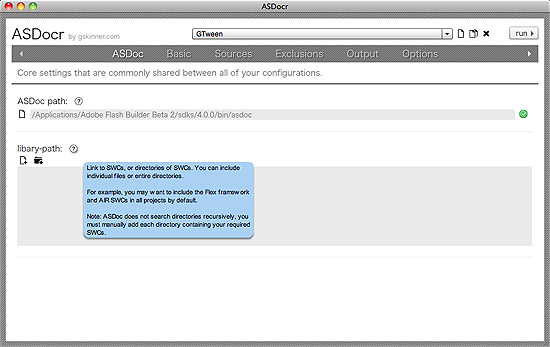
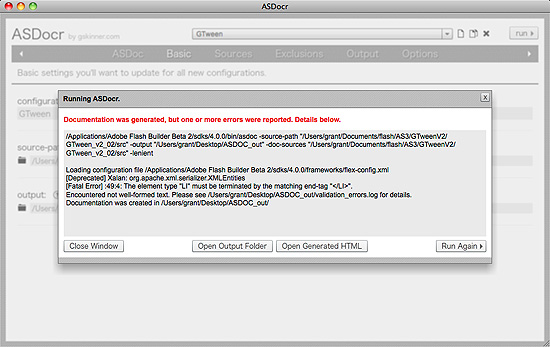
ASDocr is completely free – we built it as an internal tool, then decided to polish it up and give it away to help encourage the use of ASDoc in the ActionScript / Flash community. It also serves as a simple example of what is possible with AIR 2.0.
You can download it here:
You’ll need the latest public beta of AIR 2.0 to install it.
It works best with ASDoc v4, which is available with the latest Flex SDK or Flash Builder beta. You can get information on creating ASDoc comments here. We’ll probably incorporate a help tab in a future version with an ASDoc tag/comment reference, so everything is in one place.
We’d love to hear any feedback you have on the app. Let us know if you have ideas to improve ASDocr, or if you’ve found it useful (it motivates us to keep improving it, and releasing new tools for the community).
UPDATE: The latest version of ASDocr, with support for the AIR 2 Release Candidate can be downloaded here.

I’d really appreciate some Linux love 🙂 Does the beta allow publishing Linux AIR 2.0 apps?
I was actually just wondering about that. I don’t think it does, but I’m curious if there are plans to support it.
This is excellent, Grant! Yes, the AIR 2 beta allows you to use the native process API and creative native installers for Linux as well. In order to create the installers, you will need to do this from a Linux machine. – Rob Christensen, Product Manager, Adobe AIR
Is there ANY way in AsDoc to generate documentation for private members? This is something that still bothers me.
Some docs are for internal use and having the private members listed too would be a huge benefit.
Rob – Thanks for the info. We’ll try to build a Linux version in the next week or so.
Armand – iirc ASDoc will doc private members unless you give them an @private tag. I agree that it would be very nice if you could specify access level for documentation (public, protected, private) so you could easily build out public API documentation, and internal API documentation.
Nice work. I would like to see a tool like this add comment editing within the tool, especially where it adds html lists, tables and that you often find in Adobe’s language docs. It might be more work than it’s worth, but it’s one of those things that “if I had time…”
Awesome~!
I’ll introduce this to my korean friends through my blog.
Thanks for a good thing.
“This application requires an update to Adobe AIR that is not available for your system.”
The machine has XP SP3, Intel Core 2 Duo, 4GB RAM. Lots of other AIR apps are installed. What could this be complaining about?
Mike, You’ll need the public beta of AIR 2.0
http://labs.adobe.com/downloads/air2.html
Great! thanks a lot for sharing this with us 🙂
Gosh, this is really, really convenient! And the interface design is simple, clean, and elegant. I like it very much 🙂
Always wanted ASDoc to have a front end. Nice work and thanks for sharing!
This looks really better than the command line app although I haven’t been able to make it work. I continously get the 1046 error with some (not all) my external libraries. I am using FDT The linked libraries that break include SWFAddressEvent (not SWFAddress dunno why). Any ideas?
This is the output:
/Applications/Adobe Flex SDK 4/bin/asdoc -source-path “/Users/mga/Documents/FDT Workspace/vgline/src” -output “/Users/mga/Documents/FDT Workspace/vgline/doc” -doc-sources “/Users/mga/Documents/FDT Workspace/vgline/src” -lenient
And one error is:
/Users/mga/Documents/FDT Workspace/vgline/src/com/pingpongestudio/timeline/Timeline.as(1569): col: 39 Error: Type was not found or was not a compile-time constant: SWFAddressEvent.
private function handleSWFAddress(e:SWFAddressEvent):void {
I get this error (I only unzipped the Flex SDK):
Load config file C:\Program Files (x86)\Flex SDK\frameworks\flex-config.xml
[Fatal Error] toplevel.xml:3:115: Element type “classRec” must be followed by either attribute specifications, “>” or “/>”.
Fout: Can’t create toplevel.xml: Element type “classRec” must be followed by either attribute specifications, “>” or “/>”.
What do I do wrong?
DUDE you are amazing!
amazing! thanks a lot!!
Hi Grant,
Thanks a lot for this very usefull tool.
The exclude-classes seems not working. I can’t add several lines. When pressing Enter (line break, I’m on PC), the cursor’s goes back to position 0 on the first line. Anyway, if I add only one class, it’s still parsed.
Hi Grant,
Unfortunately the installer does not seem to be compatible wit the latest AIR 2 build (prerelease) of the 15th of the 1st – It gives the
‘This application requires an update to Adobe AIR that is not available for your system.’
Error, even thought the version of Air I have installed is newer than the one required 🙁
Hi Grant,
just found your tool, it’s really useful. Thank you! It would be awesome, if you would enable the exclusion of complete packages.
I have a package which contains all automatically generated value objects from Flash Builder. There seems to be a problem with them so that asdoc can’t handle this files. So it would be cool if I could exclude the whole package.
wow as always I am impressed with your work
Thanx Grant! It’s a dream!!!
It works very well with SDK 3.2.
I only have some problems to document class level comments for mxml components. Obviously I have used the right sintax (
x Flo: you are right, there is a little bug in the EXCLUSIONS section but you can exclude all the classes you need using the ADDITIONAL PARAMETER (in the options step):
-exclude-classes “com.domain.className”
wonderful !!!!!!!!!
Amazing, very useful!
Awesome tool!
Will not install with the latest version of AIR 2.0 runtime. Fortunately I had the air2_b2_runtime_win_111709 version, which worked great.
Adobe just released AIR 2 Beta 2 today, and this does not install.
We should be releasing a new version tomorrow for AIR 2 beta 2.
Awesome, I was just looking into creating docs at the command line and saw this tool, thought it sounded easier.
thanks
This application requires an update to Adobe AIR that is not available for your system.
When version for AIR 2 beta 2 comes out?
Doesn’t work for me.
I’ve already have the beta2 air installed.
However, it doesn’t get installed; dies with an exception “This app needs an updated version of Adobe AIR… etc”
How can I exclude multiple classes with the additional params? I tried it like this:
-exclude-classes “com.myapp.services.*;com.myapp.vo.*”
But it doesn’t work…
Is it possible to add external libraries *with source code* (not swc)? About each and every of my projects use library code like that (in different directories, updated via svn).
Couldn’t find that functionality neither in the confusing asdoc documentation nor in your (great) tool.
Any idea? Or is this just not possible?
Love the tool and it seems to work great, but I keep getting error when I generate the docs:
[Deprecated] Xalan: org.apache.xalan.res.XSLTErrorResources_en_US
I’m sure it has something to with ASDocs and not necessary ASDocr, but does anyone have any idea what causes this?
Hi, does anybody have a link to the air version which works with ASDocr? I’m not able to run it because I get “This app needs an updated version of Adobe AIR…”.
thanks
Yarp – buggered. don’t install. Uber shame – looks like a tool which the world needs! Nice one Grant.
the update has been posted here:
http://www.gskinner.com/blog/archives/2010/02/asdocr_update_f.html
Thank you very much!
It seems like it breaks with any class that either -implements an interface- or -extends a class-
For example:
public class PopulateStates extends DataProvider
ERROR: “The definition of base class DataProvider was not found.”
What am I missing? I am not trying to document DataProvider. So it isn’t really all that necessary to have it try to find it right? I tried “lenient”…that didn’t seem to work. Please advise.
I am using asdoc for an actionsciptfile which is a collection of utility finction- is not a class or part of an interface/namespace—-how do I generate documentation ina sdoc for such a file?
@San – you have “@” sign in your comments (@classRec) and it breaks down the asdoc. I had it in xml property example i my ascomment. Removed and its ok.
BUG
I have AIR version 2.0.0.11670 on Mac OSX 10.6. However, I cannot install the app due to it telling me that I don’t have AIR version 2.0. It lies. 🙂
Help please – this looks awesome
Please help…need advice on how to use this awesome utility with class files that either -implements an interface- or -extends a class-
For example:
public class PopulateStates extends DataProvider
ERROR: “The definition of base class DataProvider was not found.”
What am I missing? I am not trying to document DataProvider. So it isn’t really all that necessary to have it try to find it right? I tried “lenient”…that didn’t seem to work. Please advise.
Thanks in advance!
Hi Grant. Forgive my strange question but… I am experiencing a problem with installation.
Your app installer says i am missing an update for air that I my system does not support. I do have a MacBook Pro 17″ with snow leopard 10.6.3 and i just updated Air with your link at the Adobe labs. I rebooted, unistalled and reinstalled air, but your installer keepssaying i am missing something about the air enivronment. Since I can’t wait to use your ASDocr, could you please give me a hint? Thanks a lot, in advance, for your time. s@ch@x.
Is there any way to get this to work on OS 10.4? I’d really like to use this but I can’t install it. I’m guessing it wants OS 10.5.
I’m trying to install the ASDocr with the RC of AIR 2 runtime and the install keeps failing. Could please update ASDocr to install with the RC of AIR 2. Thanks.
Grant please help us installing asdocr on mac. I keep getting the same message also after upgrading the new beta (may 2010)… I really don’t know how to solve it. It says my version is not working a I am sure I do have the latest beta isntalled from the labs
Thank you for your time (and for asdocr, if I am able to install it 🙁 ).
Hi guys, in order to install ASDocr using the latest AIR Runtime, you will need to install version 1.2.
Instructions/links here:
http://www.gskinner.com/blog/archives/2010/05/asdocr_update_f_1.html
An error message pop up for me when I try to install it:
Error
The application was unable to install because it was snt configured in a right way. Contact the author to obtain assistance.
Nice looking tool:) as I can’t tell anything more becuase I am stopped by following error:
Loading configuration file C:\flex_sdk_4\frameworks\flex-config.xml
[Fatal Error] toplevel.xml:2375:4: Element type “id” must be followed by either attribute specifications, “>” or “/>”.
Error: Could not create toplevel.xml: Element type “id” must be followed by either attribute specifications, “>” or “/>”.
is it something I am doing? Or my classes, or buggy asdoc?
I’m also getting the [Fatal Error] toplevel.xml Error.
The toplevel.xml error is an internal error, thrown by the asdoc binary, when it has problems parsing your asdoc comments. It’s something that is outside the control of ASDocr.
Generally we’ve seen it occur due to special characters within your comments/code, or due to some error in commenting syntax, ie “@privatecomment” would throw this error, due to the missing space after “@private”.
Best tips to isolate this:
1. Turn on exclude-dependencies
2. Use doc-classes to document single classes, until you find the one that is causing the error.
3. Once you find the problem file, you need to parse through it to try and find the offending line(s).
4. Comment, fix, or delete those lines, and run ASDocr again.
This sounds as a good idea to at least pinpoint the problem, but surely it is a BUG of the ASDoc (without r:) as on error in comment it should have an option to skip it.
I’m having a hard time generating a swc for a code library with asdoc using SDK 3.5.
not necessarily using asdocr, I use the asdoc tool directly.
Have anyone any ideas on that?
Tried to install this tool, but said my AIR was not the right version, however I do have the required AIR file already
I can’t seem to get this working with a project that uses the fl.container.ScrollPanel component. Took me ages to find the component so I could integrate it into the library and now it throws an error on the component itself.
Is this not designed for use with Flash (as opposed to Flex)?
to all the people experiencing the toplevel.xml fatal error “Element type “xxxxxx” must be followed by either attribute specifications, “>” or “/>”: Question, do you have an apostrophe in your class path? i did – “D:\Graham’s Classes” – as soon as I removed it everything worked properly. hopefully that’ll save someone a few hours
Hello this tool is looking great. But do you plan Linux version also?
Hi, waht about simply provide sources for air application, then we can build a linux installer. thanks. or you can simply create an .air application, which works ok on linux. Thanks
[quote]
Hi Grant,
Unfortunately the installer does not seem to be compatible wit the latest AIR 2 build (prerelease) of the 15th of the 1st – It gives the
‘This application requires an update to Adobe AIR that is not available for your system.’
Error, even thought the version of Air I have installed is newer than the one required 🙁
Posted by: Conrad Winchester on Jan 20, 2010 3:37pm
[/quote]
Hi Grant,
I’m running into the same issue. I have AIR 2.5.1 installed on Win XP Pro SP3. Would love to try this out!
Yeah, same here as above, except I’m on Mac OSX. The installer complains about an AIR update that isn’t available. 🙁
First of all Great job !
It would be nice to export configurations to external file.
Wish that I could use this, but I’m getting the same error mentioned above on my Mac OSX 10.7 computer
Same problem as above, does this work on an extended class that impliments an Interface? It can’t get past Interface…
I get the same error as everyone else. AIR is complaining about an update even though my AIR is newer. Is this a fix on your end? I would love to try out this tool.
I’m having the problem above – I have external libraries with source code (not swc)? I don’t want to document them, but I don’t want ASDoc to break when it can’t find the class definitions, and I don’t see any place to add non-SWC libraries. Please advise!
I’m running AIR 3.2 in Windows 7, and when I try to install this application I get the Error “This application requires an update to Adobe AIR that is not available for your system” 🙁
I got this same error as above “This application requires an update to Adobe AIR that is not available for your system”. Any fix/update for this?? Thanks in advance.
Same problem as everyone else, says can’t install for my system. Would love to use.
Two and a half years later, and this tool still works great. Thanks Grant!
I was getting an error that I was missing MSVCR100.dll – in case anyone else gets this, you need to install the Visual C++ 2010 Redistributable, x86 version
Great tool, just wish I could use it……
When compiling a single class in a com folder, how can I reference the .fla library items so ASDocr can complete.
When I cast the following:
private var cap:Cap; // Error Type was not found or was not a compile-time constant: Cap.
And then trying to assign:
this.cap = new Cap(); // Error Call to a possibly undefined method Cap
Any thoughts would be appreciated.
You know what would cool if you can make this export the asdoc templates for JavaScript/TypeScript classes.
Seriously, Do it! Do it! Do it!